Affiliate disclosure: This guide contains affiliate links. If you buy through them, Savvix Finds may earn a commission at no extra cost to you. We have not tested these products ourselves; details come from Ottocast’s official product pages. Prices checked 23 Oct 2026 and can change.
Waiting in the car while the kids are at practice, charging an EV, or on a long road-trip break? Your car’s big screen is perfect for a video, but Apple CarPlay and Android Auto don’t allow YouTube or Netflix. Here’s how people add streaming to a car screen, which Ottocast products do it, and what to check before you buy.
Safety first: Only watch video when the car is safely parked. Watching video while driving is illegal in most countries and puts you and others at risk.
🚚 Ottocast ships to the 🇺🇸 US and 🇬🇧 UK from its official stores. Standard delivery is about 10–15 days after dispatch (Ottocast’s figure); import taxes may apply.
Quick picks
- Best value for streaming apps: Play2Video Ultra Wireless CarPlay/Android Auto All-in-1 Adapter (US$89.00)
- Newest Play2Video model: Play2Video X Wireless CarPlay/Android Auto All-in-1 Adapter (US$109.00)
- Best if you want to play your own device (HDMI): Car TV Mate Max: Wireless CarPlay & Android Auto with HDMI™ Multimedia (US$74.00)
- Most features (Android box): OttoAibox P3 CarPlay AI Box (US$189.00)
3 ways to watch video on your car screen
- All-in-one streaming adapter (e.g. Play2Video Ultra or X): plugs into the CarPlay USB port, gives you wireless CarPlay/Android Auto plus built-in apps like YouTube and Netflix.
- HDMI adapter (e.g. Car TV Mate Max): shows whatever you plug in by HDMI, such as a streaming stick or console.
- Android AI box (e.g. OttoAibox P3): a small Android computer for your car screen, with its own SIM/CloudSIM option.
Step by step: setting it up
- Check your car has factory wired CarPlay, and use the compatibility checker on the Ottocast product page.
- Park safely.
- Plug the adapter into the USB port your car uses for CarPlay.
- Pair your phone (for wireless CarPlay/Android Auto) following Ottocast’s instructions.
- Connect to the internet using a method Ottocast supports for your model, then sign in to your streaming apps.
- Install firmware updates (Ottocast lists FOTA updates via the OttoPilot app for several models).
Comparison table
| Product | Price (23 Oct 2026) | How you get video | Wireless CarPlay/AA | Best for |
|---|---|---|---|---|
| Play2Video Ultra | US$89 | Built-in apps + App Hub | Yes | Best value streaming |
| Play2Video X | US$109 | Streaming apps | Yes | Newest Play2Video |
| Car TV Mate Max | US$74 | HDMI input | Yes | Your own HDMI device |
| OttoAibox P3 | US$189 | Android 12, SIM/CloudSIM | Yes | Most features |
The products
Play2Video Ultra Wireless CarPlay/Android Auto All-in-1 Adapter
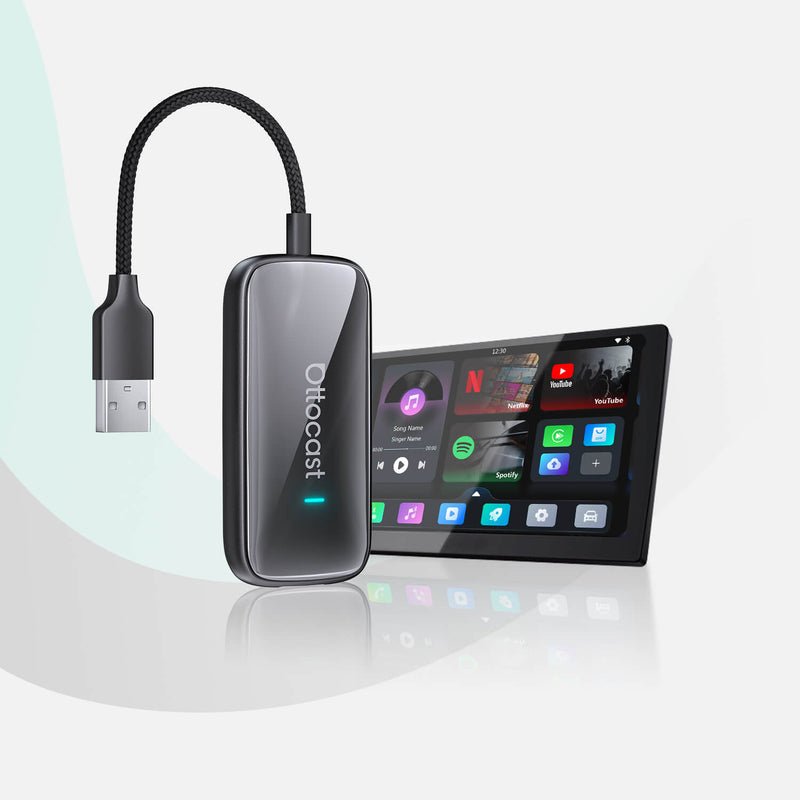
Price checked 23 Oct 2026: US$89.00 (crossed-out price shown on Ottocast: US$109.00). Sold by Ottocast (ottocast.com).
Best value for streaming apps.
Who it’s for: Drivers with factory wired CarPlay who want wireless CarPlay/Android Auto plus built-in streaming apps for breaks, at the lowest price of the streaming options here.
Pros (from Ottocast’s official specs)
- Converts wired CarPlay to wireless CarPlay and wireless Android Auto, per Ottocast
- Pre-installed Netflix, YouTube, IPTV and Prime Video, per Ottocast
- App Hub: add up to 5 more apps (Ottocast names e.g. JOYN, U-NEXT, DAZN)
- Closed Android system and over-the-air (FOTA) updates via the OttoPilot app
Cons
- Needs factory wired CarPlay in the car
- Closed system: you can only add apps through the App Hub, not install anything you like
- Streaming needs an internet connection; check Ottocast’s page for how it gets online
Buy now at Ottocast Affiliate link
Play2Video X Wireless CarPlay/Android Auto All-in-1 Adapter

Price checked 23 Oct 2026: US$109.00 (crossed-out price shown on Ottocast: US$159.00). Sold by Ottocast (ottocast.com).
Newest Play2Video model.
Who it’s for: Anyone who wants Ottocast’s latest Play2Video adapter, which we also cover in our CarPlay adapter guide.
Pros (from Ottocast’s official specs)
- Wireless CarPlay and Android Auto
- Ottocast lists access to streaming apps such as Netflix, YouTube and Prime Video
Cons
- US$20 more than the Play2Video Ultra; Ottocast’s page doesn’t give a full side-by-side spec list, so compare both pages before buying
- Streaming needs an internet connection
Buy now at Ottocast Affiliate link
Car TV Mate Max: Wireless CarPlay & Android Auto with HDMI™ Multimedia

Price checked 23 Oct 2026: US$74.00 (crossed-out price shown on Ottocast: US$107.00). Sold by Ottocast (ottocast.com).
Best if you want to play your own device (HDMI).
Who it’s for: People who’d rather plug in an HDMI source, e.g. a streaming stick or a games console, than use built-in apps.
Pros (from Ottocast’s official specs)
- HDMI™ input and wired projection to show video, games or presentations on the car screen, per Ottocast
- Also converts wired CarPlay to wireless CarPlay or Android Auto
- Automatic reconnection and FOTA updates
- Plugs into the factory wired CarPlay USB port, no tools needed
Cons
- No built-in streaming apps listed: you bring the HDMI source
- More cables in the car than an all-in-one adapter
Buy now at Ottocast Affiliate link
OttoAibox P3 CarPlay AI Box

Price checked 23 Oct 2026: US$189.00 (crossed-out price shown on Ottocast: US$209.00). Separate North America and Europe/Asia/Australia/Middle East/South America versions. Sold by Ottocast (ottocast.com).
Most features (Android box).
Who it’s for: Tech fans who want a full Android 12 system on the car screen with its own connectivity.
Pros (from Ottocast’s official specs)
- Android 12 system (OttoDrive 2.0), per Ottocast
- CloudSIM and a SIM card slot to stay online without your phone’s hotspot
- Wireless CarPlay and Android Auto
- HDMI™ output, SD card slot, LED lights, FOTA updates
Cons
- Most expensive option here
- CloudSIM data is a separate purchase (Ottocast sells CloudSIM plans from US$12.99)
- Pick the right regional version at checkout
Buy now at Ottocast Affiliate link
More car gadgets
Just want to cut the cable? Read our best wireless CarPlay & Android Auto adapters guide, or browse all our smart gadgets.
FAQ
Can I watch YouTube or Netflix on my car’s CarPlay screen?
Not with CarPlay alone: Apple CarPlay and Android Auto don’t offer video apps. Adapters like the Ottocast Play2Video range or an Android ‘AI box’ plug into the car’s CarPlay USB port and add streaming apps to the screen.
Is it legal to watch video in the car?
Only while the car is safely parked with the engine stopped or in a safe place. Watching video while driving is illegal in most countries and dangerous. Passengers’ screens can also distract the driver, so follow your local traffic laws.
Will this work in my car?
These products generally need a car with factory wired CarPlay (a USB port that shows CarPlay when you plug in your iPhone). Use the compatibility checker on each Ottocast product page before you buy.
How do these adapters get internet?
Streaming needs data. The OttoAibox P3 lists CloudSIM and a SIM card slot. For the other models, check Ottocast’s product page for the supported ways to connect in your setup.
Which is cheapest?
On 23 Oct 2026, the Car TV Mate Max was US$74 (needs your own HDMI device), the Play2Video Ultra was US$89 with built-in apps, the Play2Video X was US$109 and the OttoAibox P3 was US$189.
I only want wireless CarPlay, no video. What should I get?
Then a simpler adapter is enough. See our guide to the best wireless CarPlay & Android Auto adapters.
Prices and specs from ottocast.com, checked 23 Oct 2026. Prices are in US dollars and can change; shipping or import costs may apply. Links marked “Affiliate link” may earn us a commission.